ESP32-C5 Wireshark Sniffer
Turn cheap ESP32-C5 boards into dual-band (2.4 GHz + 5 GHz) Wi-Fi sniffers that show up as ordinary capture interfaces inside Wireshark — with a toolbar for changing channels while the capture runs, and support for several boards at once.
Flash a board from this page
Plug an ESP32-C5 into a USB port using its native USB connector, then press the button. Nothing to install.
Chrome / Edge 89+, Firefox 151+, Chrome for Android. Not Safari.
BOOT button once. This is a quirk of the board, not the
firmware — it happened on two of the three boards this tool was developed against.
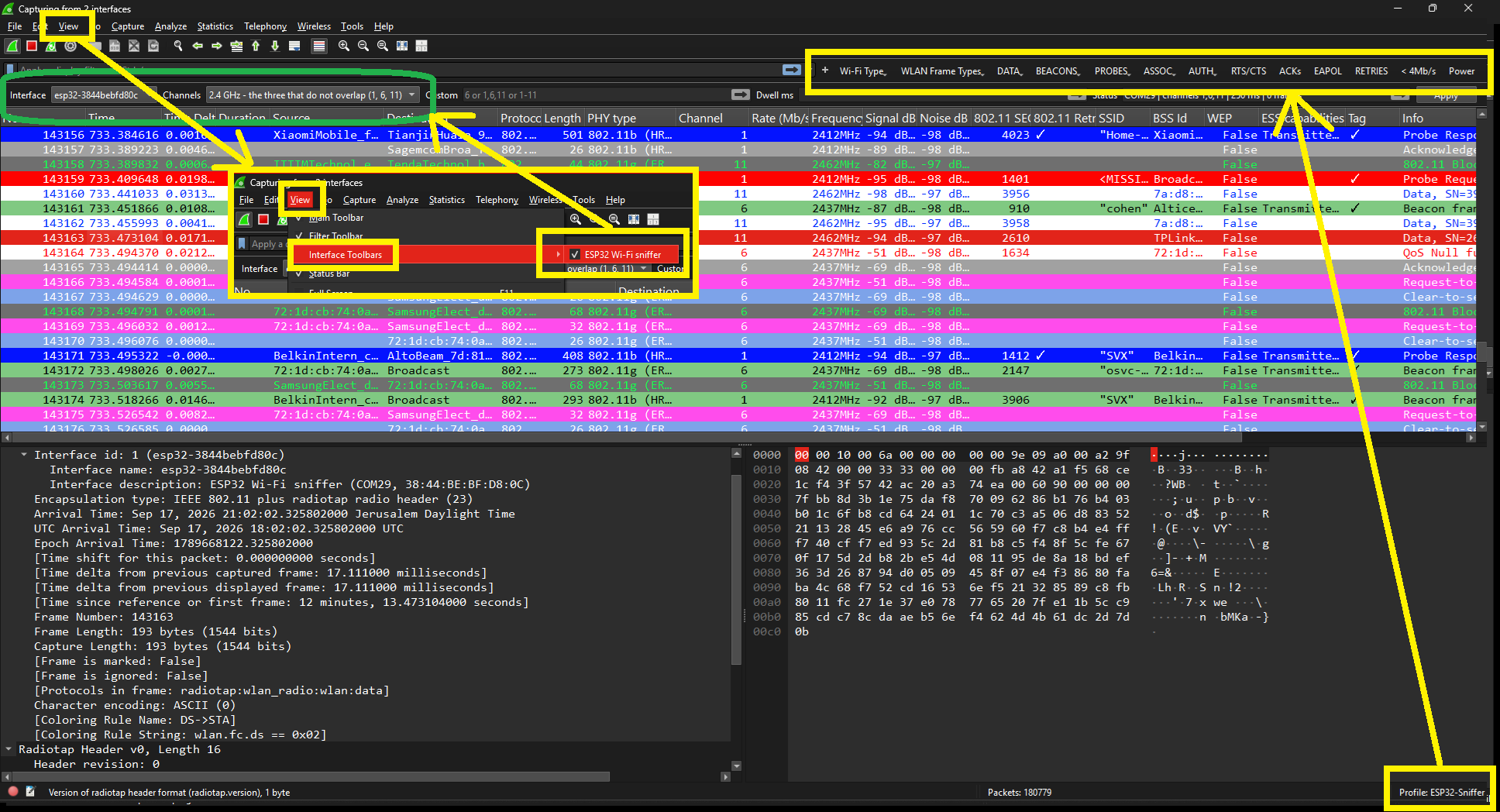
ESP32-Sniffer profile that installs with the tool.
What you get
| Each board is an interface | Plug in two or three and Wireshark lists them all. Capture from several at once and the frames merge into one window, each tagged with the board it came from. |
|---|---|
| Channels, your way | One channel (6), several (1,6,11), a range (1-11)
or a mix (1-13,36,149-165). Tick them in a list, or type them. |
| Change it live | View → Interface Toolbars gives you a channel picker and a dwell time that retune the board mid-capture, without restarting it. |
| Dual band | 2.4 GHz channels 1–14 and 5 GHz 36–177, on the same board. |
| Radio detail | Every frame carries a radiotap header: channel, frequency, signal and noise in dBm, so Wireshark’s Wi-Fi columns and filters all work. |
| Zigbee and Thread too | The same board sniffs IEEE 802.15.4 on channels 11–26, as a second interface. Wireshark dissects Zigbee, 6LoWPAN and Thread from it with nothing extra installed. |
| And Bluetooth LE advertising | A third interface captures BLE advertising — beacons, trackers, and whatever a device broadcasts before anyone connects to it. Not connection traffic: see below. |
Set up the Wireshark side
Flashing the board is only half of it. The other half is one command.
1. Requirements
- Wireshark 4.2 or newer
- Python 3.8+ with
pyserial
2. Register the sniffer with Wireshark
git clone https://github.com/oshri-almog/esp32c5-wireshark-sniffer
cd esp32c5-wireshark-sniffer
pip install -r requirements.txt
python extcap/install.py
That installs a small launcher into Wireshark’s extcap folder and the
ESP32-Sniffer Wireshark profile (Wi-Fi columns, colouring rules and filter buttons
for beacons by Wi-Fi generation, probes, auth, RTS/CTS, ACKs, EAPOL and more). An existing profile
of that name is never overwritten.
3. Capture
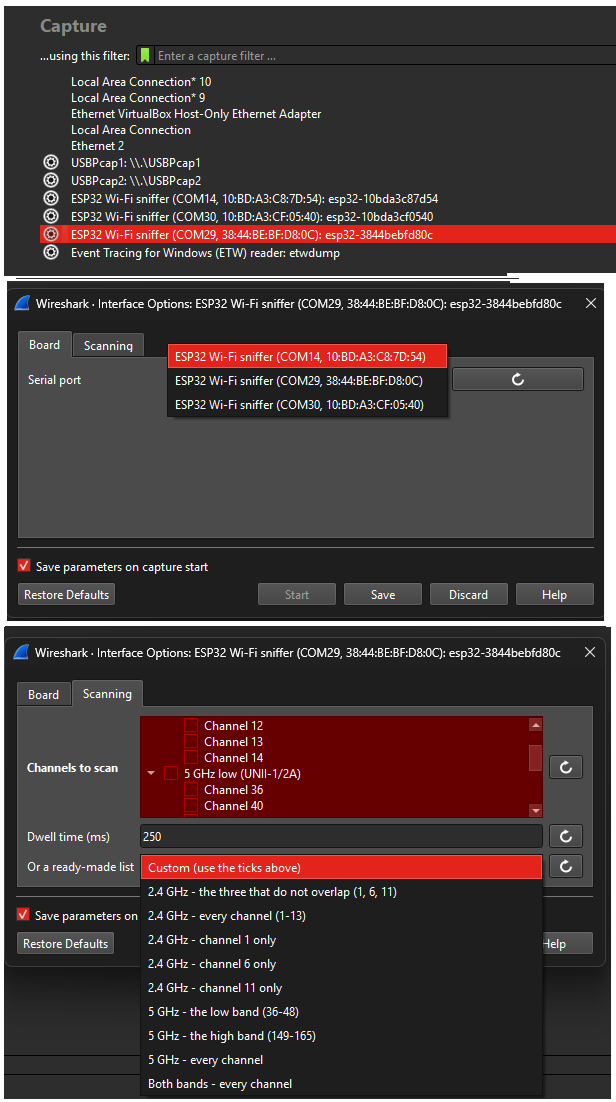
- Open Wireshark. Press F5 if the board is not in the list yet.
- Double-click ESP32 Wi-Fi sniffer (COM14, …).
- Use the gear icon next to it to pick the serial port, the channels and the dwell time.
- Turn on View → Interface Toolbars → ESP32 Wi-Fi sniffer to change channels while capturing.

4. Zigbee and Thread
Every board is listed three times, once per radio. The second entry, ESP32 Zigbee/Thread sniffer, captures raw IEEE 802.15.4 on channels 11–26 instead of Wi-Fi. It behaves exactly like the Wi-Fi one — same tick list, same toolbar — and Wireshark dissects Zigbee, 6LoWPAN and Thread from it without any extra plugin.
A board captures Wi-Fi or 802.15.4, never both: there is one radio and one antenna. Choosing the other interface reboots the board, which takes a second or two before frames appear. That is deliberate — handing the antenna between the two radios while running leaves the radio in a state that only unplugging the board clears.
Zigbee traffic above the network layer is encrypted. To read it, put the network key into Preferences → Protocols → ZigBee NWK. Thread shows up as 6LoWPAN and IPv6 with no key needed.
5. Bluetooth LE
The third entry, ESP32 Bluetooth LE advertising sniffer, captures BLE advertising: beacons, trackers, and whatever a device broadcasts before anyone connects to it. Wireshark dissects it with its ordinary Bluetooth dissectors, so addresses, device names, manufacturer data and iBeacon payloads all come out named. Twenty seconds in an ordinary flat picked up 27 different advertisers here.
Two smaller things follow from the same limit. The controller will not be restricted to one advertising channel, so there is no channel list for this interface — it listens on 37, 38 and 39 together. And it does not report which of them a packet arrived on, so every packet is recorded as channel 37. The capture also carries no CRC, and says so rather than claiming one was checked.
extcap\wireshark-fusion.bat, or set
QT_STYLE_OVERRIDE=Fusion once, and the boxes become visible again without giving up
dark mode.
Flashing without this page
If you would rather use a terminal, or you are on Safari:
# with ESP-IDF v5.5 or newer
cd firmware
idf.py set-target esp32c5
idf.py -p COM14 flash

# or flash the prebuilt merged image with esptool
esptool --chip esp32c5 --port COM14 write_flash 0x0 esp32c5-sniffer-1.2.0-merged.bin
Download the merged firmware image
(1.1 MiB, flashes at offset 0x0).
Troubleshooting
| Board missing from Wireshark | Press F5 in Wireshark. Check the board appears as a serial port
(USB VID 303A, PID 1001). |
|---|---|
| “Serial connection failed” | Only one program may hold a serial port. Close any serial monitor, and any second copy of the capture. |
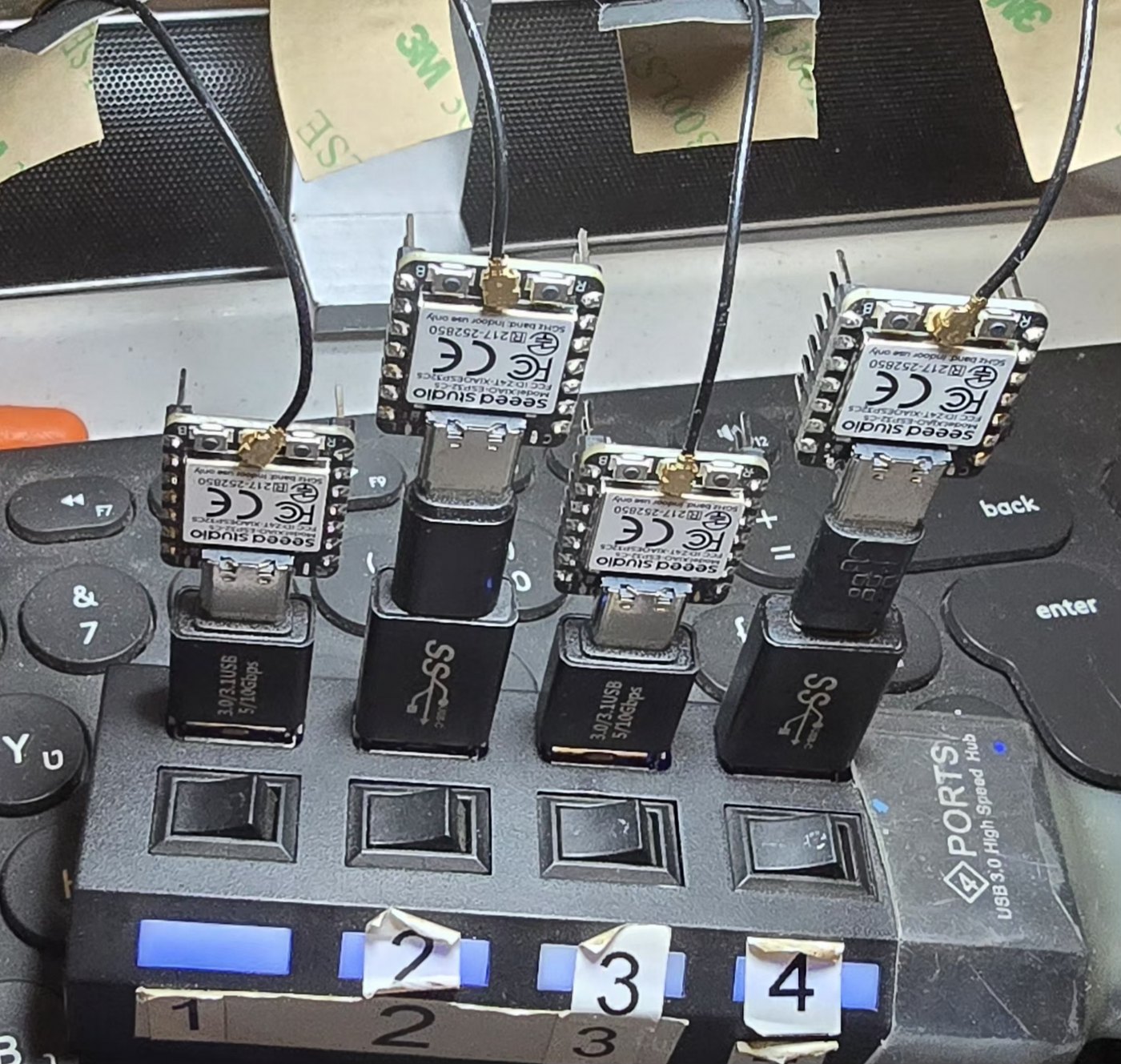
| Random failures, ports renumbering | Almost always the USB link. Use a powered hub or a direct port, and a known-good data cable. A faulty cable and an unpowered hub cost this project hours of confusing, intermittent errors. |
| Nothing captured | Check the channel actually carries traffic, and that the board is not sitting in download mode (power-cycle it). |
A board prints <<START>> and then nothing |
It is almost certainly listening with the other radio. A board remembers its radio across
reboots, so one last used for Zigbee or Thread stays there, sends its marker and header,
and then waits on a band with nothing on it. Nothing is wrong with it. Wireshark sets the
radio itself, so this only bites in a serial monitor or with
host/sniffer.py — pass --mode wifi to bring it back. |
| No Wi-Fi after using the Zigbee/Thread interface | Rare, and a reset will not clear it: unplug the board and plug it back in. The two radios share one antenna, and a board that has run 802.15.4 can come back deaf to Wi-Fi until it actually loses power. The firmware gives the radio back cleanly before it reboots, which avoids this in normal use. |
| Frames marked malformed | A few per thousand is normal: the Wi-Fi driver reports some MIMO frames with metadata that does not match their contents. The rest of the capture is unaffected. |
How it works
Wi-Fi driver --callback--> ring buffer --writer task--> USB-Serial-JTAG
                                                            |
                                          extcap plugin (Python) --pipe--> Wireshark
The firmware puts the radio in promiscuous mode and writes libpcap records straight to the board’s native USB port — nothing else shares that port, so the byte stream stays clean (logs go to UART instead). A frame is sent whole or dropped whole, so the stream never loses framing, and the host resynchronises on a marker if it ever does.